
When you’ll see the question
The Spotify profile protection panel appears in Review & submit when your release goes to Spotify and bills an artist whose Spotify profile we haven’t delivered to from your account before. It says: “Before our first delivery to a profile, tell us whether it needs approval.” You answer once per profile. Your answer is saved on your account and used for later releases to the same profile.Answer the question
For each artist, answer Does this profile have Artist Profile Protection turned on?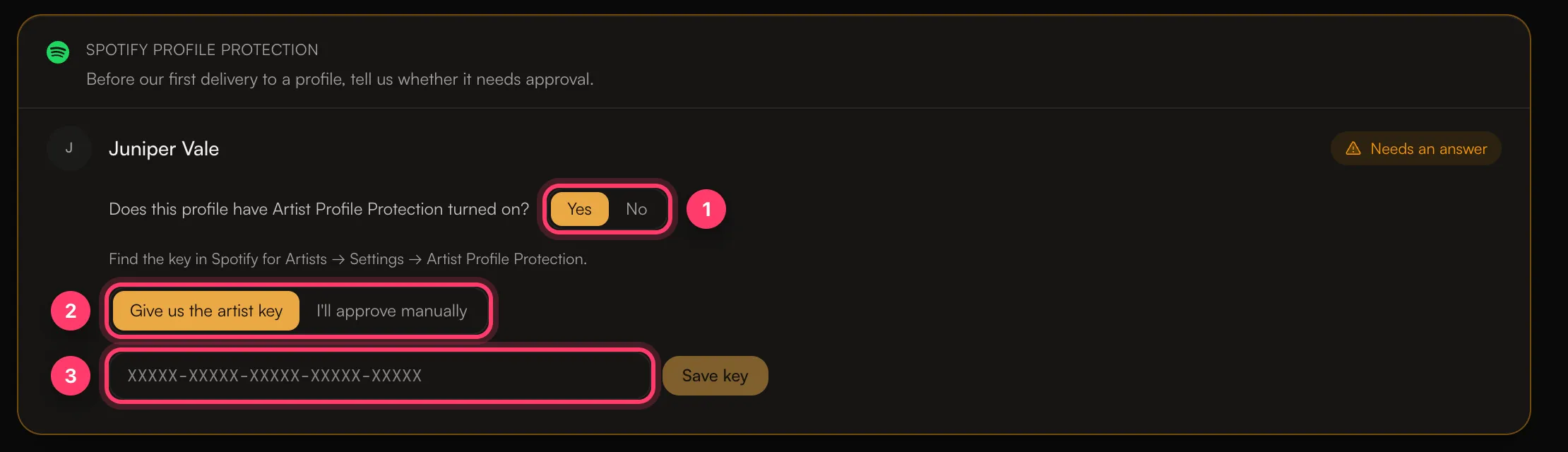
If protection is off
Click No, then Confirm protection is off. The status changes to Protection off.If protection is on
Click Yes, then choose how the release should be approved:- Give us the artist key. Paste the key in the format
XXXXX-XXXXX-XXXXX-XXXXX-XXXXXand click Save key. You find the key in Spotify for Artists → Settings → Artist Profile Protection. The status changes to Artist key saved. We store the key securely and use it so Spotify accepts the delivery. - I’ll approve manually. You approve the release yourself in Spotify for Artists after it’s delivered. Click I understand to confirm. Until you approve it, the release may be delayed or may not appear on the profile. The status changes to You’ll approve in Spotify for Artists.